The Digital Imaging Chain#
A photograph is not a window onto a scene. It’s the end product of a chain of transformations — from light source to surface to sensor to screen to eye to brain. Each stage reshapes the signal. Each is a place where information can be lost or distorted. Understanding this chain is what separates deliberate color decisions from guesswork.
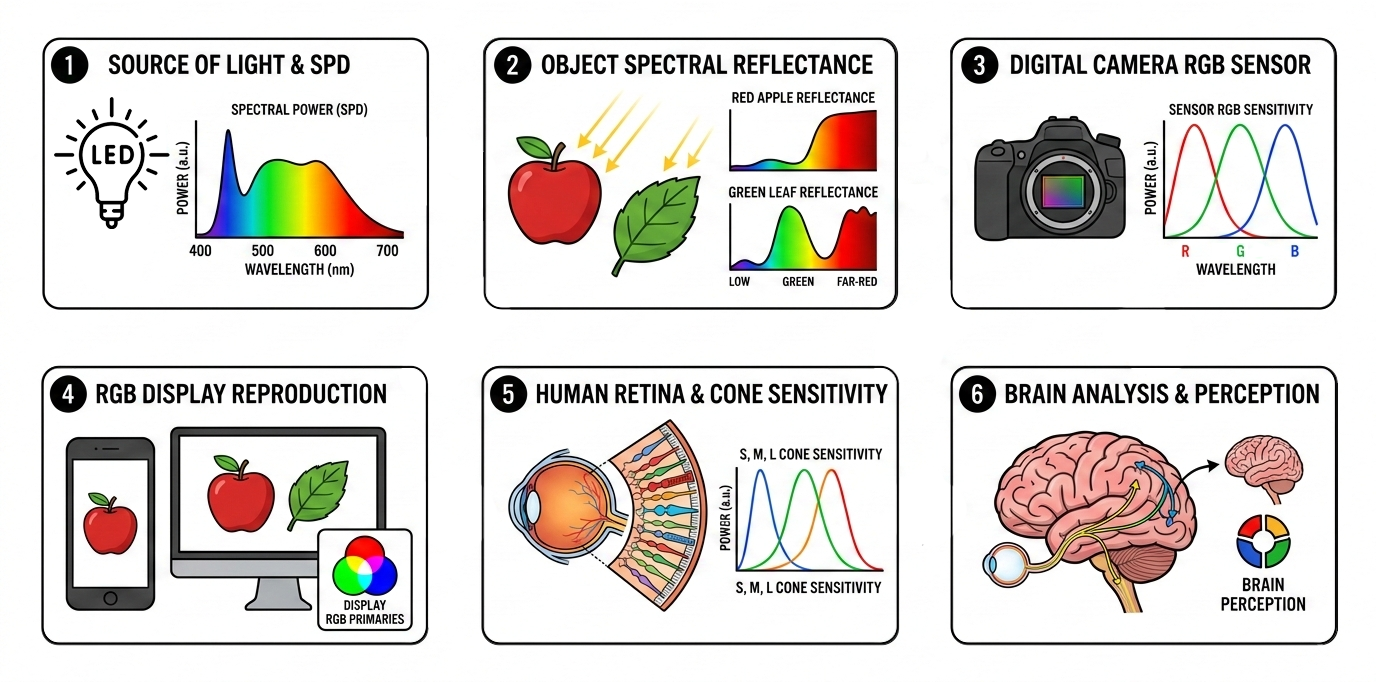 The chain of transformations from light source to perceived color. Every stage shapes the final result.
1. The light source#
Every light has a spectral power distribution. Sunlight is broad and continuous. An LED has gaps. A sodium lamp is a spike. If wavelengths are missing from the illuminant, no amount of downstream processing can recover the colors that depended on them. What isn’t in the light can’t be in the photograph.
2. Object reflectance#
The surface selectively absorbs and reflects wavelengths from the incoming light. A red shirt under full-spectrum light looks red. Under an LED with a cyan valley, that same shirt may look subtly wrong — the light it needed to reflect wasn’t there.
3. Camera capture#
The sensor’s three-channel Bayer filter collapses the incoming spectrum into R, G, B values. These filter curves don’t match human cone sensitivity — which is why raw sensor data requires color processing to produce a photograph that looks right to the eye. Bit depth limits how much tonal nuance survives. A weak channel — red underwater, for instance — may be buried in noise.
On top of the sensor’s limitations, the camera must decide white balance — its guess about what the illuminant looked like. If the guess is right, neutrals come out neutral and the image looks natural. If it’s wrong, the entire image shifts: too warm, too cool, or tinted in a way that no amount of contrast or saturation adjustment can fix. Auto white balance assumes the scene contains something neutral — and when it doesn’t (sunset, stage lighting, underwater), the correction can produce completely wrong results. This is why shooting RAW matters: the white balance decision can be deferred and corrected later, rather than baked into a JPEG.
4. Screen reproduction#
The display recreates color from three narrow-band emitters. It can only produce colors within its gamut — the range of colors the hardware can physically display. The same image file can look noticeably different on two screens: a laptop panel, a phone, a desktop monitor. Color varies with the display’s gamut coverage, factory calibration, brightness, viewing angle, and ambient light in the room.
Professional color-critical work relies on hardware-calibrated monitors — displays profiled with a colorimeter to match a known standard (sRGB, Display P3, Adobe RGB). These are expensive, require regular recalibration, and are still only as good as the viewing environment. Most photographs are viewed on uncalibrated consumer screens, where what you see is an approximation at best.
This article follows the digital photography workflow: sensor → file → screen → eye. A printed photograph introduces a different chain: the file goes through CMYK conversion instead of screen display, and the final result depends on the viewing illuminant — the light under which the print is seen. Different chain, different failure modes.
5. Eye response#
The viewer’s three cone types sample the light from the display. But not everyone’s cones are the same. Cone sensitivity varies between individuals. Color vision deficiency — affecting roughly 8% of males and 0.5% of females 1 — changes the response fundamentally. And with age, the crystalline lens gradually yellows — a process called brunescence — absorbing more blue and violet light before it reaches the retina. The perceived color of everything shifts warmer over a lifetime.
6. Brain interpretation#
The visual cortex applies chromatic adaptation, fills in from memory colors, and judges color in context. The same patch of color looks different against different backgrounds — as Adelson’s checker shadow illusion demonstrates: two squares of identical luminance appear completely different because the brain interprets them in the context of light and shadow. A more dramatic example is The Dress — a photograph where the same pixels were perceived as either blue-and-black or white-and-gold by different viewers, depending on whether their visual system assumed the dress was in shadow (blue illuminant) or warm light. Same image, same screen, opposite colors — because the brain doesn’t just read pixel values, it interprets them based on an assumed illuminant 2. The brain sees what it expects, not always what’s there.
Steps 5 and 6 matter less in practice — as long as the color was captured and reproduced correctly in steps 1–4, the eye and brain do a good job interpreting the result. The problems that ruin photographs happen earlier in the chain.
Where it works — and where it doesn’t#
On land, most of these stages are good enough. The light is usually broad-spectrum. The camera’s auto white balance has a reasonable chance of guessing the illuminant — or at least is in a position to guess, because the scene statistics make sense. The screen is close enough. The brain adapts. The errors at each stage are small and largely cancel out.
Underwater, the chain breaks early and each broken step compounds the next. First, water strips entire wavelength regions from the ambient light — reds vanish within meters, then oranges, then yellows. The illuminant reaching the scene is no longer broad-spectrum; it’s what’s left after the water column has taken its cut. Second, the subjects themselves lose visible color — a reef fish or a soft coral may have vivid reds and oranges, but with no red light to reflect, those colors simply don’t appear. The information isn’t hidden; it was never captured. Third, the camera’s auto white balance tries to correct based on what the sensor recorded — but the input is so far from any terrestrial illuminant model that the correction is unreliable at best, and actively wrong at worst.
That’s why underwater color correction isn’t a preference or a style choice. It’s an attempt to repair the first link (restoring the light that water removed) and the third (applying a white balance that accounts for the underwater illuminant) — so that everything downstream has something to work with.
So far, everything has assumed light traveling through air — a medium so transparent we can ignore it. The next article drops that assumption and covers what water does to light, and why it makes photography fundamentally harder: What Water Does to Light.
References#
-
Birch, J. (2012). “Worldwide prevalence of red-green color deficiency.” Journal of the Optical Society of America A, 29(3), 313–320. DOI: 10.1364/JOSAA.29.000313. ↩︎
-
Gegenfurtner, K.R., Bloj, M. & Toscani, M. (2015). “The many colours of ’the dress’.” Current Biology, 25(13), R543–R544. DOI: 10.1016/j.cub.2015.04.043. ↩︎